

A Way to Disable Cursor Movement Animation in Word 2016 by Using the Windows Classic Theme

This post shows _a_ way to disable cursor animation in Word by enabling the Windows Classic theme.
Aug 8th 2018 Update: This post has been superseded by: http://www.zachpfeffer.com/single-post/Disable-Microsoft-Office-Excel-Cell-Movement-Animations-and-Word-Cursor-Animations
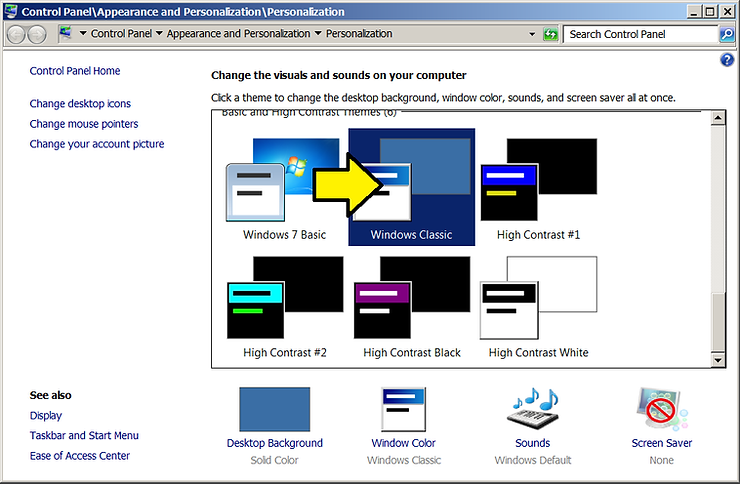
April 1st 2018 Update: after rebooting, I found that the cursor was animated. I checked the theme. It was still on Windows Classic. I selected Windows 7 Basic then re-selected Windows Classic and the animation went away again.
Steps to Enable Windows Classic after Turning off unnecessary animation
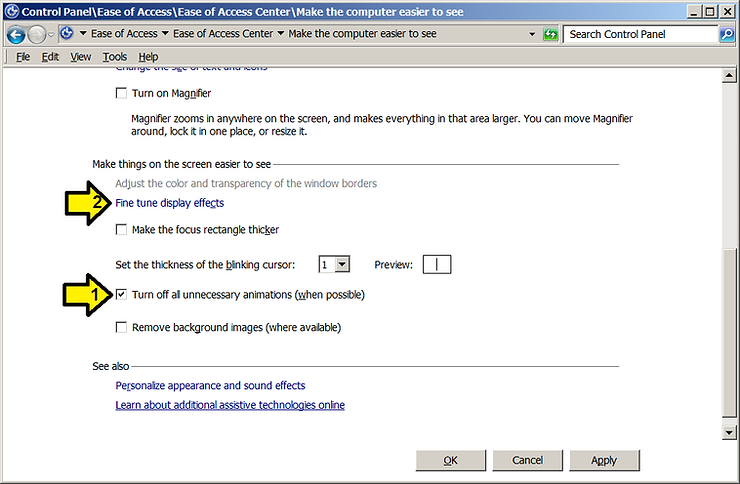
1. Fine tune display effects
On Make the computer easier to see page
After clicking the (1) Turn off all unnecessary animations (when possible) box
Click on (2) Fine tune display effects
2. Click on Windows Classic
References
- Word image from link