

Format JavaScript in Vim on Windows per Google’s Style Guide
This post lists how to use clang-format in Vim on Windows while writing JavaScript code as suggested in Googles JavaScript style guide.
Versions Used
-
Windows 7 SP1
-
VIM - Vi IMproved 8.1 (2018 May 18, compiled Dec 16 2018 23:02:07) available at [link]
-
LLVM 8.0.0 @ SVN r347735 (29 November 2018) at [link] posted at [link]
-
Python 3.7.1 at [link]
Steps
1. Download Python 3.7.1 at [link].
Install it using defaults for all options.
2. Download gvim_8.1.0606_x64-mui2.exe at [link].
Install it using defaults for all options.
It will be installed to c:\Program Files\vim.
3. Download the Windows installer (64-bit) LLVM-8.0.0-r347735 at [link]
Use the following settings when installing LLVM:
During installation: select Add LLVM to the system PATH for all users and select the Create LLVM Desktop Icon checkbox
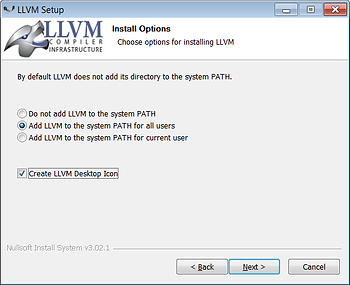
…and accept the default Destination Folder C:\Program Files\LLVM
Install it.
4. Open your _vimrc by typing :vi ~\_vimrc
Add the following to your _vimrc file:
map <C-K> :pyf C:/Program\ Files/LLVM/share/clang/clang-format.py<cr>
imap <C-K> <c-o>:pyf C:/Program\ Files/LLVM/share/clang/clang-format.py<cr>

function! Formatonsave()
	let l:formatdiff = 1
	pyf C:/Program\ Files/LLVM/share/clang/clang-format.py
endfunction
autocmd BufWritePre *.js call Formatonsave()
This allows the user to visually select code and press control-k to format it according to Google JavaScript coding guidelines.
It also auto formats the code when the file is saved.
5. Type :source ~\_vimrc to read the file into the currently running session.
6. Type :vi ~/test.js and paste this in:
var parse_url =
/^(?:([A-Za-z]+):)?(\/{0,3})([0-9.\-A-Za-z]+)(?::(\d+))?(?:\/([^?#]*))?(?:\?([^#]*))?(?:#(.*))?$/;

var url = "http://www.ora.com:80/goodparts?q#fragment";
var result = parse_url.exec(url);
var names =
[ 'url', 'scheme', 'slash', 'host', 'port', 'path', 'query', 'hash' ];
var blanks = ' ';
var i;
for (i = 0; i < names.length; i += 1) {
document.writeln(names[i] + ':' + blanks.substring(names[i].length),
result[i]);
}
7. Type :w
If everything is working you’ll see:
var parse_url =
    /^(?:([A-Za-z]+):)?(\/{0,3})([0-9.\-A-Za-z]+)(?::(\d+))?(?:\/([^?#]*))?(?:\?([^#]*))?(?:#(.*))?$/;

var url = "http://www.ora.com:80/goodparts?q#fragment";
var result = parse_url.exec(url);
var names =
    [ 'url', 'scheme', 'slash', 'host', 'port', 'path', 'query', 'hash' ];
var blanks = ' ';
var i;
for (i = 0; i < names.length; i += 1) {
  document.writeln(names[i] + ':' + blanks.substring(names[i].length),
                   result[i]);
}
8. To test, open another Vim window and type :vi ~\program.html
Paste this:
<html><body><pre><script src="test.js">
</script></pre></body></html>
9. Open c:\Users\pfefferz\program.html
(replace pfefferz with your username)
You should see:
url:http://www.ora.com:80/goodparts?q#fragment
scheme:http
slash://
host:www.ora.com
port:80
path:goodparts
query:q
hash:fragment
References