

Command Line 2019.1 Xilinx FSBL Rebuild and Test

This post demonstrates how to create and build a 2019.1 FSBL from the command line, package it Into a BOOT.BIN and run it on a ZCU102, then boot the FSBL over JTAG after adding a “Hello, World!” line.
Assumptions
A built 2019.1 ZCU102 BSP exists
2019.1 Xiinx SDK is installed
# A lightweight Xilinx SDK installer is at https://www.xilinx.com/member/forms/download/xef.html?filename=Xilinx_SDK_2019.1_0524_1430_Lin64.bin
# To install the 2019.1 XSDK run:
chmod +x ~/Downloads/Xilinx_SDK_2019.1_0524_1430_Lin64.bin
~/Downloads/Xilinx_SDK_2019.1_0524_1430_Lin64.bin
# Installed to:
~/xsdk/
Create and Build a 2019.1 FSBL From the Command Line
# Open a terminal and run
PATH=~/xsdk/SDK/2019.1/bin/:$PATH
WS=~/plxprjs/fsbl-2019.1
HDF=~/plxprjs/xilinx-zcu102-2019.1/project-spec/hw-description/system.hdf
# Create the workspace directory
mkdir -p $WS
# Create HW from the HDF
xsct -eval “setws $WS; createhw -name hw0 -hwspec $HDF”
# Create the FSBL
xsct -eval “setws $WS; createapp -name fsbl -app {Zynq MP FSBL} -proc psu_cortexa53_0 -hwproject hw0 -os standalone”
# Build the FSBL
xsct -eval “setws $WS; projects -build”
# Find it
find $WS/ -name “*.elf”
# Example output
# /home/demo/plxprjs/fsbl-2019.1/fsbl/Debug/fsbl.elf
Package it Into a BOOT.BIN and Run it On a ZCU102
# Package it:
# Run inside a petalinux project:
petalinux-package –boot –u-boot –dtb –fsbl /home/demo/plxprjs/fsbl-2019.1/fsbl/Debug/fsbl.elf –force
# Copy to an SD Card:
cp images/linux/BOOT.BIN /media/demo/BDFD-EDD6/
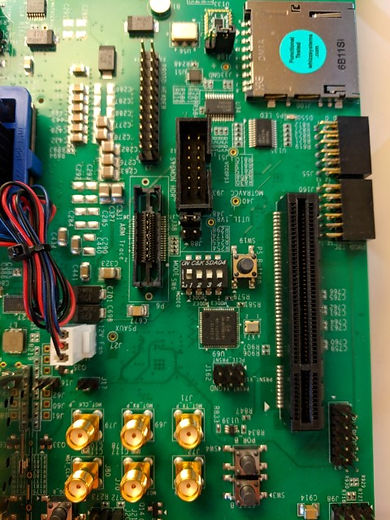
# Change ZCU102 to
Boot Mode: SD1 LS (3.0) Mode Pins[3:0]: 1110
# Start screen to see the output
screen /dev/ttyUSB0 115200
# Use Ctrl-a d to quit
# Boot
# You should see when you built this
# Xilinx Zynq MP First Stage Boot Loader
# Release 2019.1 Sep 6 2021 - 13:21:07
Boot Using JTAG
# Power off the ZCU102
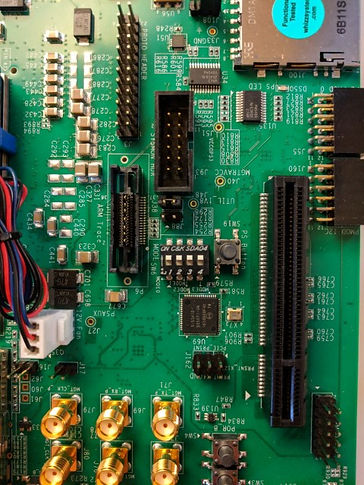
# Change ZCU102 to PS JTAG Mode
Boot Mode: PS JTAG
Mode Pins[3:0]: 0000
-
# Plug in the USB to JTAG cable
# From ~/plxprjs/xilinx-zcu102-2019.1
petalinux-boot –jtag –u-boot -v
# Copy the output, save it as:
# ~/plxprjs/xilinx-zcu102-2019.1/boot_u-boot.tcl
# Update the path to the FSBL elf in boot_u-boot.tcl to:
# ~/plxprjs/fsbl-2019.1/fsbl/Debug/fsbl.elf
# Open XSCT
PATH=~/xsdk/SDK/2019.1/bin/:$PATH
xsct
# Run in xsct:
connect
targets
# Run
source ~/plxprjs/xilinx-zcu102-2019.1/boot_u-boot.tcl
# Make a change in the FSBL code:
vi +364 ~/plxprjs/fsbl-2019.1/fsbl/src/xfsbl_main.c
# Add Hello, World! after Xilinx Zynq MP First Stage Boot
XFsbl_Printf(DEBUG_PRINT_ALWAYS,
“Xilinx Zynq MP First Stage Boot Loader \n\r”);
XFsbl_Printf(DEBUG_PRINT_ALWAYS,
“Hello, World! \n\r”);
# Build it:
xsct -eval “setws $WS; projects -build”
# Power on the ZCU102 in JTAG bode
# Run in xsct:
connect
targets
source ~/plxprjs/xilinx-zcu102-2019.1/boot_u-boot.tcl
# You should now see:
Xilinx Zynq MP First Stage Boot Loader
Hello, World!
Release 2019.1 Sep 6 2021 - 13:54:48
Reference
- The Xilinx graphic is from [link]
