How To Clone, Create a Branch, and Contribute it to a GitHub Repository Using Git Bash on Windows
This post shows how to Clone, Create a Branch, and Contribute it to a GitHub Repository Using Git Bash on Windows. It answers:
-
How do I launch Git Bash?
-
How do I get a repo, aka how do I clone a repo?
-
How do I switch to a branch?
-
How do I commit to a branch?
-
How do I create a pull request?
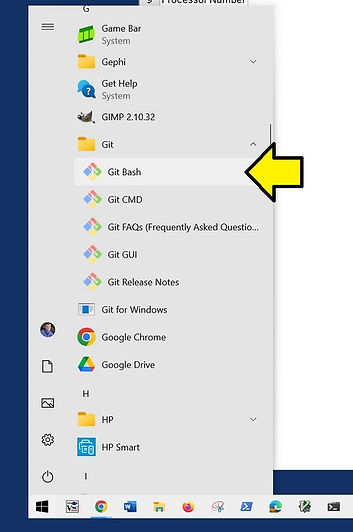
How do I launch Git Bash?
Launch Git Bash:
How do I get a repo, aka how do I clone a repo?
1. In Git Bash:
cd /c
2. Clone Using the Web URL
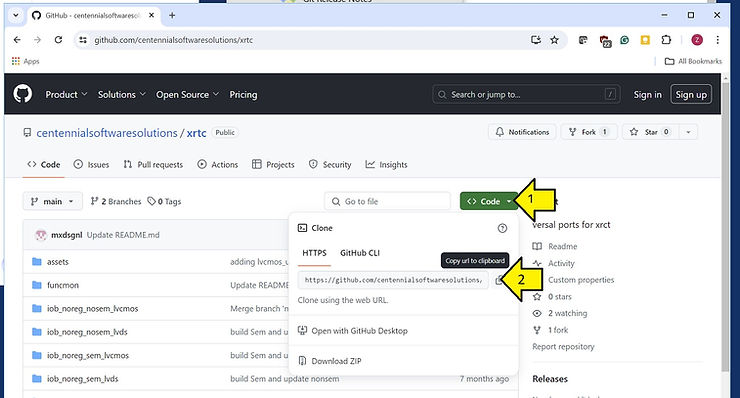
3. In Git Bash:
Output:
Cloning into 'xrtc'...
remote: Enumerating objects: 238, done.
remote: Counting objects: 100% (238/238), done.
remote: Compressing objects: 100% (179/179), done.
remote: Total 238 (delta 111), reused 150 (delta 50), pack-reused 0
Receiving objects: 100% (238/238), 4.20 MiB | 8.96 MiB/s, done.
Resolving deltas: 100% (111/111), done.
How do I switch to a branch?
1.In Git Bash:
cd xrtc
git status
Output:
On branch main
Your branch is up to date with 'origin/main'.

nothing to commit, working tree clean
2. List Local Branches
git branch # Lists local branches
Output:
Zach Pfeffer@LAPTOP-3MCNKKJO MINGW64 /c/xrtc (main)
$ git branch # Lists local branches
* main
3. List all Remote Branches
git branch -r # Lists all remote branches
Output:
origin/HEAD -> origin/main
origin/austin
origin/main
4. Show What Origin Points To:
git remote show origin
Output:
* remote origin
  Fetch URL: https://github.com/centennialsoftwaresolutions/xrtc.git
  Push  URL: https://github.com/centennialsoftwaresolutions/xrtc.git
  HEAD branch: main
  Remote branches:
    austin tracked
    main   tracked
  Local branch configured for 'git pull':
    main merges with remote main
  Local ref configured for 'git push':
    main pushes to main (up to date)
5. List Remote Branches:
git branch -a # Lists all branches, including remote ones
Output:
* main
  remotes/origin/HEAD -> origin/main
  remotes/origin/austin
  remotes/origin/main
6. Check Out a Remote Branch:
git checkout -b austin origin/austin
Output:
Switched to a new branch 'austin'
Branch 'austin' set up to track remote branch 'austin' from 'origin'.
7. Check You’re on the Branch:
git status
Output:
On branch austin
Your branch is up to date with 'origin/austin'.
nothing to commit, working tree clean
How do I Commit to a Branch, aka Contribute it to a GitHub Repository?
1. Commit and Push:
cd /c/xrtc
echo 'Test Push 2024-04-14' > testpush-2024-04-14.txt
cat testpush-2024-04-14.txt
git config --global user.email "[email protected]"
git config --global user.name "Get Help"
git add testpush-2024-04-14.txt
git status
git add .
git status
git commit -m "Checking that I can push to austin"
git pull origin austin
git push origin austin
Output:
Zach Pfeffer@LAPTOP-3MCNKKJO MINGW64 /c/xrtc (austin)
$ cd /c/xrtc

Zach Pfeffer@LAPTOP-3MCNKKJO MINGW64 /c/xrtc (austin)
$ echo 'Test Push 2024-04-14' > testpush-2024-04-14.txt

Zach Pfeffer@LAPTOP-3MCNKKJO MINGW64 /c/xrtc (austin)
$ cat testpush-2024-04-14.txt
Test Push 2024-04-14

Zach Pfeffer@LAPTOP-3MCNKKJO MINGW64 /c/xrtc (austin)
$ git config --global user.email "[email protected]"

Zach Pfeffer@LAPTOP-3MCNKKJO MINGW64 /c/xrtc (austin)
$ git config --global user.name "Get Help"

Zach Pfeffer@LAPTOP-3MCNKKJO MINGW64 /c/xrtc (austin)
$ git add testpush-2024-04-14.txt

Zach Pfeffer@LAPTOP-3MCNKKJO MINGW64 /c/xrtc (austin)
$ git status
On branch austin
Your branch is up to date with 'origin/austin'.

Changes to be committed:
  (use "git restore --staged <file>..." to unstage)
        new file:   testpush-2024-04-14.txt


Zach Pfeffer@LAPTOP-3MCNKKJO MINGW64 /c/xrtc (austin)
$ git add .
Zach Pfeffer@LAPTOP-3MCNKKJO MINGW64 /c/xrtc (austin)
$ git status
On branch austin
Your branch is up to date with 'origin/austin'.

Changes to be committed:
  (use "git restore --staged <file>..." to unstage)
        new file:   testpush-2024-04-14.txt


Zach Pfeffer@LAPTOP-3MCNKKJO MINGW64 /c/xrtc (austin)
$ git commit -m "Checking that I can push to austin"
[austin 6ae20d2] Checking that I can push to austin
 1 file changed, 1 insertion(+)
 create mode 100644 testpush-2024-04-14.txt

Zach Pfeffer@LAPTOP-3MCNKKJO MINGW64 /c/xrtc (austin)
$ git pull origin austin
From https://github.com/centennialsoftwaresolutions/xrtc
 * branch            austin     -> FETCH_HEAD
Already up to date.

Zach Pfeffer@LAPTOP-3MCNKKJO MINGW64 /c/xrtc (austin)
$ git push origin austin
Enumerating objects: 4, done.
Counting objects: 100% (4/4), done.
Delta compression using up to 12 threads
Compressing objects: 100% (2/2), done.
Writing objects: 100% (3/3), 315 bytes | 315.00 KiB/s, done.
Total 3 (delta 1), reused 0 (delta 0), pack-reused 0
remote: Resolving deltas: 100% (1/1), completed with 1 local object.
To https://github.com/centennialsoftwaresolutions/xrtc.git
   1edcc99..6ae20d2  austin -> austin
How do I create a pull request?
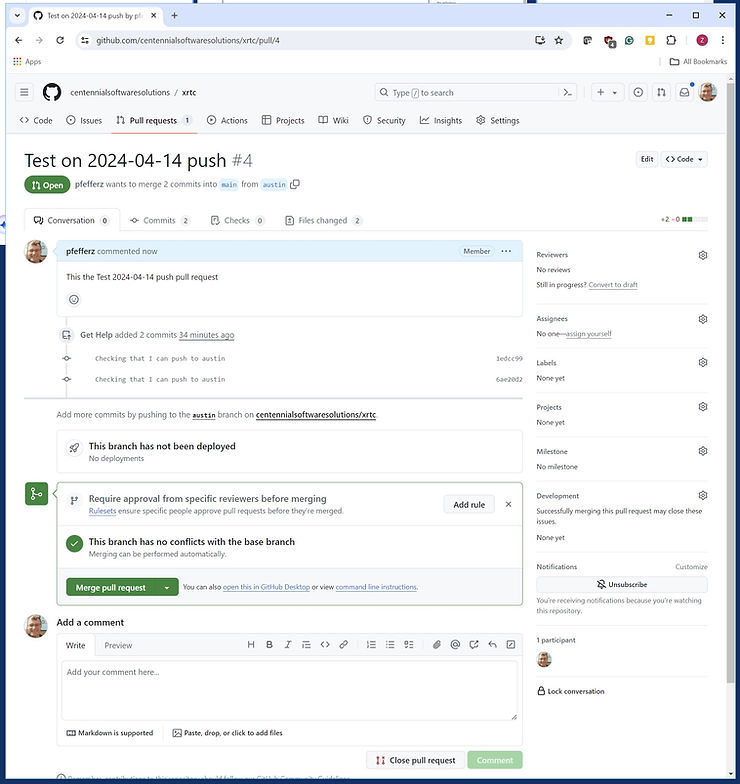
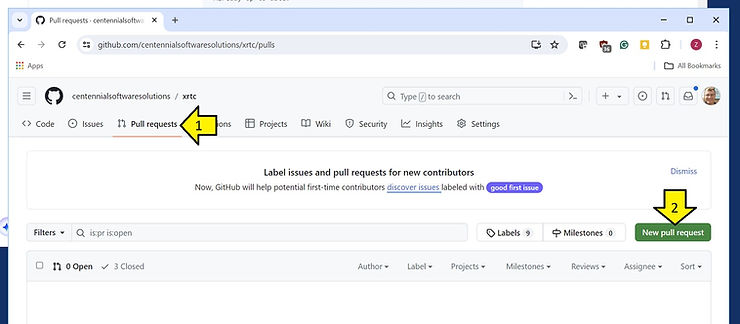
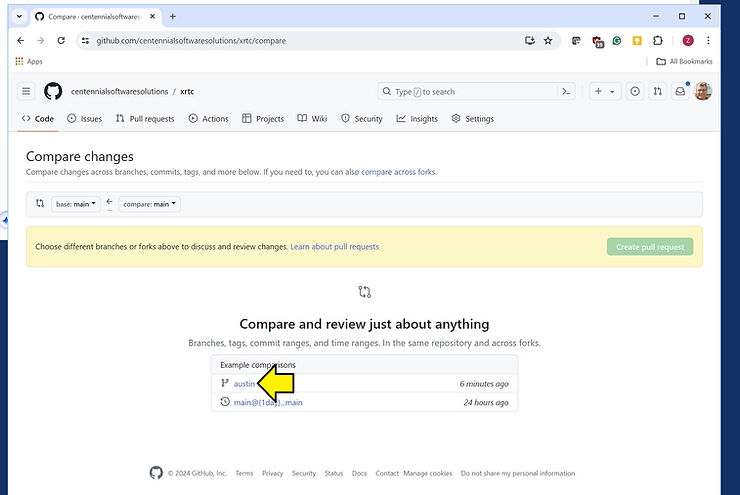
1. Create a Pull Request
2. Click the Branch
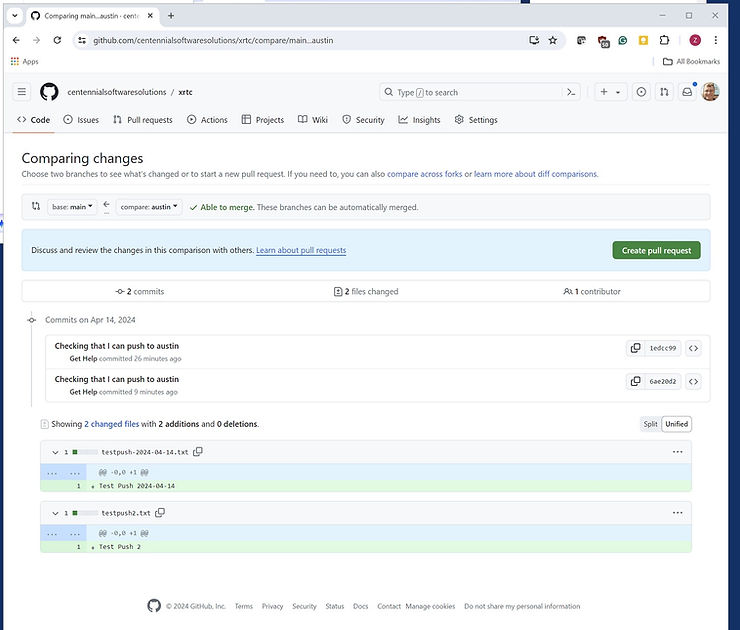
3. Click the ‘Create pull request’ Button
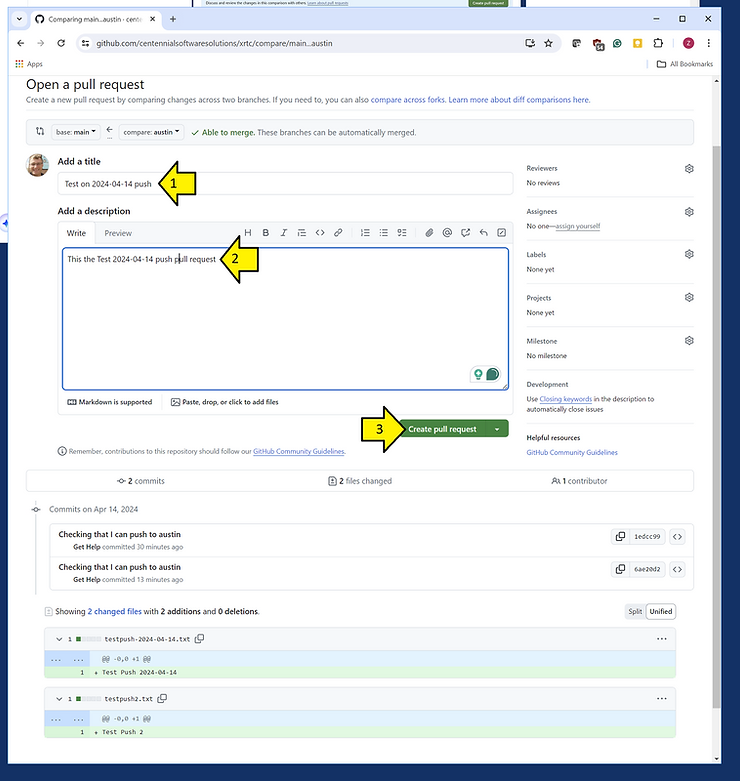
4. Add the Title and a Description and Click ‘Create pull request’
Output: