
Installing 2017.4 Vivado and SDK on Linux

This post walks through installing the 2017.4 version of Vivado and the SDK on a Linux box.
Warning:
You will need around 80 GB of diskspace and 30 minutes to install Vivado:
17 GB for the archive +
17 GB for the expanded archive +
46 GB for the installed program = 80 GB
1. Download Xilinx_Vivado_SDK_2017.4_1216_1.tar.gz from the Xilinx.com download center @ [link]*
*Note: This link cannot be used in a wget command. You need to open the link in a web browser, login with a Xilinx account and then your download will start.
2. Extract the archive:
time tar -zxvf Xilinx_Vivado_SDK_2017.4_1216_1.tar.gz
Took 5 min on Ubuntu 16.04 running on VirtualBox on T460.
3. Remove the original install archive:
rm Xilinx_Vivado_SDK_2017.4_1216_1.tar.gz
4. Run xsetup
cd Xilinx_Vivado_SDK_2017.4_1216_1
./xsetup
You should see:

5. Click each I Agree checkbox and click Next >

6. Click the Vivado HL System Edition radio button and click Next >

7. Click the Engineering Sample Devices check box and click Next > (45.61 GB needed)

8. Find a directory that has enough space. Click Next >
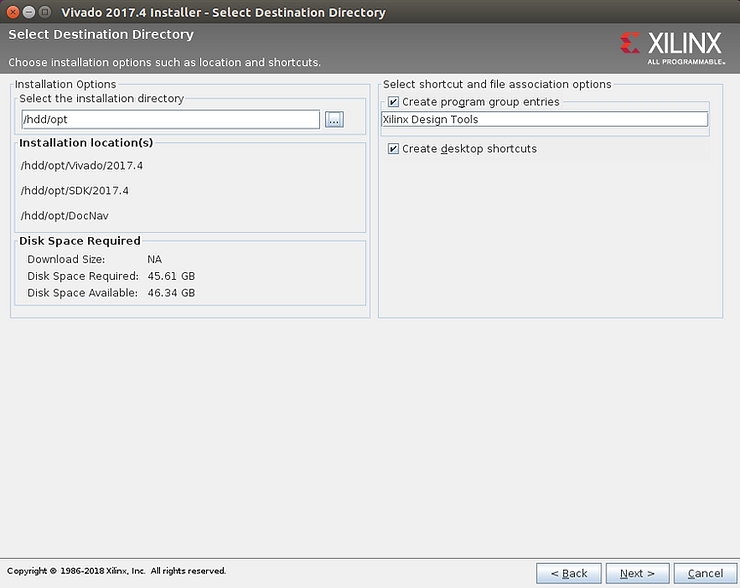
If the install asks you to create the directory click okay.
9. Click Install

10. Select the Get Vivado or IP Evaluation Licenses radio button and click Connect Now

11. Click on Vivado Design Suite (No ISE): 30-Day Evaluation License and click the Generate Node-Locked License button. Then enter in a Host Name, OS, Ethernet MAC and the Host ID Value. Use ifconfig to look up the Ethernet address.

12. Check your email. mkdir -p $HOME/.Xilinx. Save the license to $HOME/.Xilinx. You may need to:
mv ~/Downloads/Xilinx.lic $HOME/.Xilinx/
13. Close the Web browser (otherwise the License Manager will appear hung). Exit the License Manager.

14. Test that everything works by Launching Vivado. Type Viv (or SDK) in the launcher and select Vivado.

Follow UG973 to install Linux cable drivers
Sizes
Download
Size in bytes
pfefferz@plc2:/hdd/pkgs$ ls -l
total 16960100
-rwxrwxrwx 1 pfefferz pfefferz 17367136047 Mar  1 16:56 Xilinx_Vivado_SDK_2017.4_1216_1.tar.gz
pfefferz@plc2:/hdd/pkgs$ ls -lh
total 17G
-rwxrwxrwx 1 pfefferz pfefferz 17G Mar  1 16:56 Xilinx_Vivado_SDK_2017.4_1216_1.tar.gz
Size in human readable bytes
Expanded
Size in bytes
pfefferz@plc2:/hdd/pkgs$ du -s Xilinx_Vivado_SDK_2017.4_1216_1
17275572	Xilinx_Vivado_SDK_2017.4_1216_1
Size in human readable bytes
pfefferz@plc2:/hdd/pkgs$ du -sh Xilinx_Vivado_SDK_2017.4_1216_1
17G	Xilinx_Vivado_SDK_2017.4_1216_1
Reference
Logo via https://twitter.com/xilinxinc at link.
