

Practice Splitting a Window Horizontally and Vertically, Moving Between the Windows and Closing Them

This post allows you to practice splitting a window horizontally and vertically, moving between the windows and closing the windows.
TL;DR
:split
:vsplit
Control-w l
Control-w j
Control-w k
ZZ
ZZ
:q
Steps
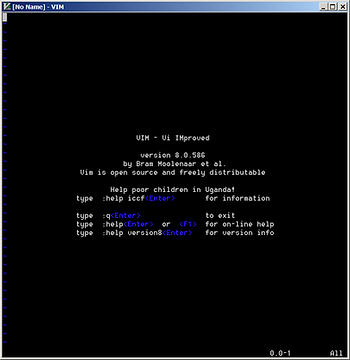
1. Run Vim
You’ll see:
2. Split the screen horizontally by typing:
:split
You’ll see the following. The cursor will be where the yellow arrow points.

Note: the cursor is in the upper window
3. Split the screen vertically by typing:
:vsplit
You’ll see the following. The cursor will be where the yellow arrow points.
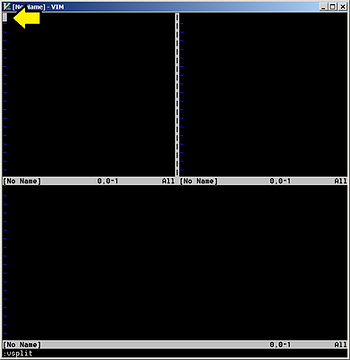
Note: the cursor is in the upper left window
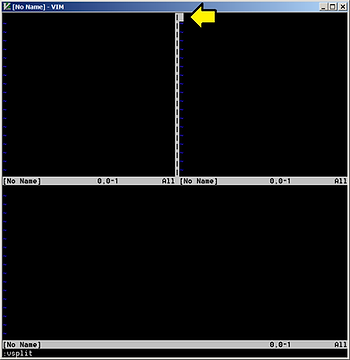
4. Move right by typing:
Control-w l
You’ll see the following. The cursor will be where the yellow arrow points.
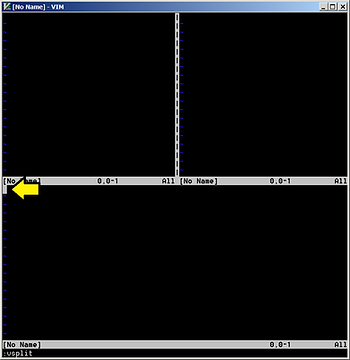
5. Move down by typing:
Control-w j
You’ll see the following. The cursor will be where the yellow arrow points.
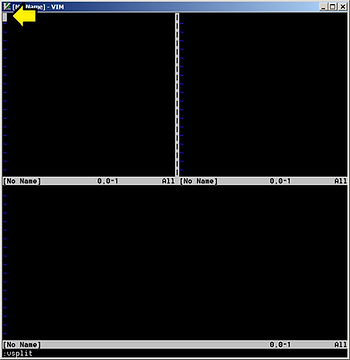
6. Move up by typing:
Control-w k
You’ll see the following. The cursor will be where the yellow arrow points.
7. Close the window by typing:
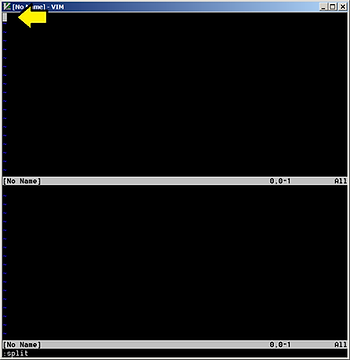
ZZ
You’ll see the following. The cursor will be where the yellow arrow points.
8. Close the other window by typing:
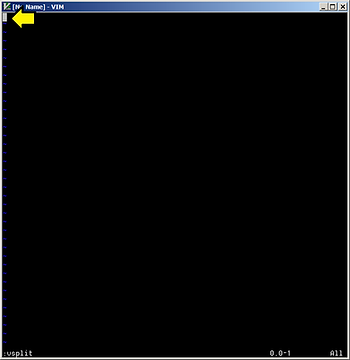
ZZ
You’ll see the following. The cursor will be where the yellow arrow points.
9. Quit Vim by typing:
:q
Alternative Split Commands*
:split
:sp
Control-w s
Control-w Control-s
Horizontal Split
Vertical Split
:vsplit
:vs
Control-w v
Control-w Control-v
Reference
