

What runs when I click the “Xilinx SDK 2017.4” icon in Ubuntu?

This post shows how to figure out what runs when you click on the “Xilinx SDK 2017.4” in Ubuntu 16.04.2.
Steps
To figure out what happens when you click here:
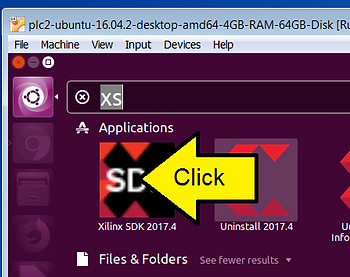
1. Change to your home directory
cd ~
2. Change to the directory that holds the .desktop files
cd .local/share/applications
3. Open Xilinx SDK 2017.4_1521588724262.desktop
vi Xilinx\ SDK\ 2017.4_1521588724262.desktop
or
cat Xilinx\ SDK\ 2017.4_1521588724262.desktop
.desktop
[Desktop Entry]
Encoding=UTF-8
Type=Application
Name=Xilinx SDK 2017.4
Comment=Xilinx SDK 2017.4
Icon=/hdd/opt/Xilinx/SDK/2017.4/data/sdk/images/sdk_logo.png
Exec=/hdd/opt/Xilinx/SDK/2017.4/bin/xsdk
5. If you run xsdk the SDK will boot as if you clicked on it.
6. xsdk also accepts these command line options:
pfefferz@plc2:~$ /hdd/opt/Xilinx/SDK/2017.4/bin/xsdk --help

Display Options:
  -help
	Help -- just display this message and quit.
  -version
	Display Version and quit.

  -batch
	SDK Tcl Batch Mode.

  -wait
	Wait for SDK to complete.

Options:
  -workspace <Workspace location>
	Specify the Workspace directory for SDK projects
  -hwspec <hardware specification file>
	Specify the XML file to load.
  -bit <bitstream file>
	Specify the Bitsteam file to use for programming FPGA
  -bmm <bmm file>
	Specify the BMM file to use for BRAM initialization
  -batch -source <tcl script file>
	Specify tcl Script file to executee all commands in SDK batch mode
  {-lp <repository_path>}
	Add <repository_path> to the list of Driver/OS/Library search directories.
  -eclipseargs <eclipse arguments>
	Any other arguments that should be passed to Eclipse.
	This should follow all other SDK arguments.
  -vmargs <java vm arguments>
	Any other arguments that should be passed to Java VM.
	This should follow all other SDK arguments.
References