

Which Linux kernel is PetaLinux Tools using?

This post shows you a way to figure out which Linux kernel PetaLinux Tools is pulling in.
Versions Used
PetaLinux 2017.4 (install help at link , creating a PetaLinux build help at link)
Motivation
If you hit an issue you need to know _exactly_ which source code tree you’re working with and the exact version of that tree.
Steps
1. In your PetaLinux build search for “Documentation”
find . -name "Documentation"
You should see:
./build/tmp/work-shared/plnx_aarch64/kernel-source/drivers/staging/greybus/Documentation
./build/tmp/work-shared/plnx_aarch64/kernel-source/drivers/staging/iio/Documentation
./build/tmp/work-shared/plnx_aarch64/kernel-source/drivers/staging/unisys/Documentation
./build/tmp/work-shared/plnx_aarch64/kernel-source/drivers/staging/i4l/Documentation
./build/tmp/work-shared/plnx_aarch64/kernel-source/drivers/staging/most/Documentation
./build/tmp/work-shared/plnx_aarch64/kernel-source/tools/objtool/Documentation
./build/tmp/work-shared/plnx_aarch64/kernel-source/tools/perf/Documentation
./build/tmp/work-shared/plnx_aarch64/kernel-source/tools/build/Documentation
./build/tmp/work-shared/plnx_aarch64/kernel-source/Documentation
The Linux kernel “Documentation” folder is in the root folder of the kernel so the kernel is at:
./build/tmp/work-shared/plnx_aarch64/kernel-source/Documentation
2. Cd into the root of the checked out kernel tree:
cd ./build/tmp/work-shared/plnx_aarch64/kernel-source
3. Look at the HEAD commit
git show HEAD
You should see:
commit b450e900fdb473a53613ad014f31eedbc80b1c90
Author: Sakari Ailus <[email protected]>
Date:   Wed Nov 1 20:22:30 2017 -0700

    imx274: Fix error handling

    Fix error handling in driver probe and unregister the correct control handler
    in driver remove.

    Signed-off-by: Sakari Ailus <[email protected]>
    Signed-off-by: Christian Kohn <[email protected]>
    Reviewed-by: Vishal Sagar <[email protected]>
    Signed-off-by: Michal Simek <[email protected]>

diff --git a/drivers/media/i2c/imx274.c b/drivers/media/i2c/imx274.c
index ab6a5f3..737dbf5 100644
--- a/drivers/media/i2c/imx274.c
+++ b/drivers/media/i2c/imx274.c
@@ -1770,8 +1770,7 @@ static int imx274_probe(struct i2c_client *client,
        return 0;

 err_ctrls:
-       v4l2_async_unregister_subdev(sd);
-       v4l2_ctrl_handler_free(sd->ctrl_handler);
+       v4l2_ctrl_handler_free(&imx274->ctrls.handler);
 err_me:
        media_entity_cleanup(&sd->entity);
 err_regmap:
@@ -1788,7 +1787,7 @@ static int imx274_remove(struct i2c_client *client)
        imx274_write_table(imx274, mode_table[IMX274_MODE_STOP_STREAM]);

        v4l2_async_unregister_subdev(sd);
-       v4l2_ctrl_handler_free(sd->ctrl_handler);
+       v4l2_ctrl_handler_free(&imx274->ctrls.handler);
        media_entity_cleanup(&sd->entity);
        mutex_destroy(&imx274->lock);
        return 0;
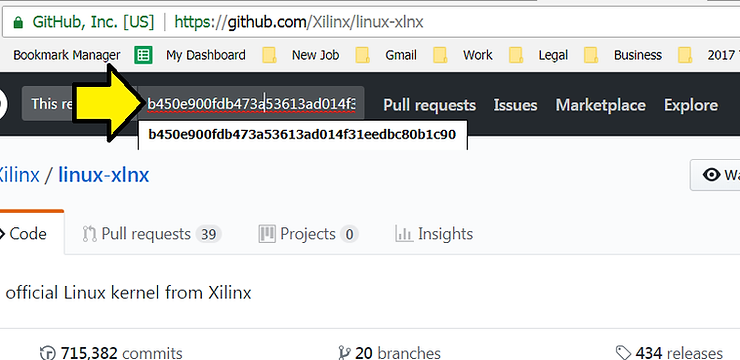
5. Click on Commits
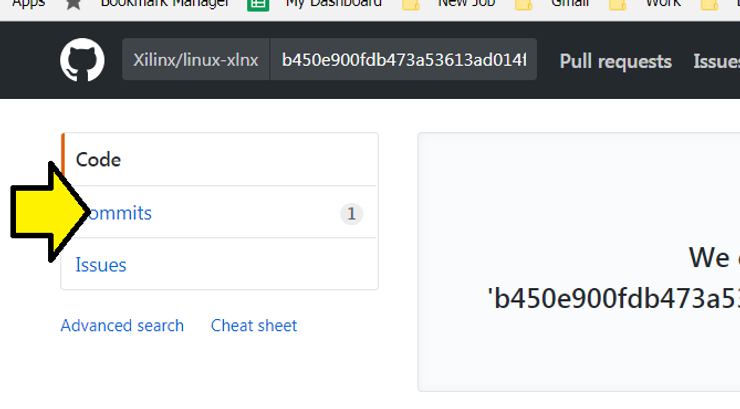
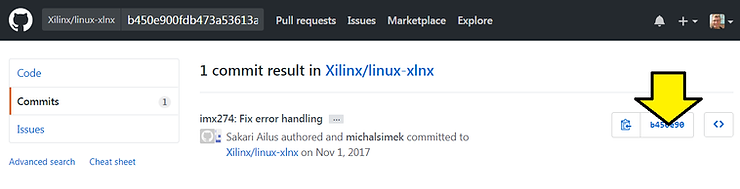
6. Click on the b45e90
7. Click on Browse files
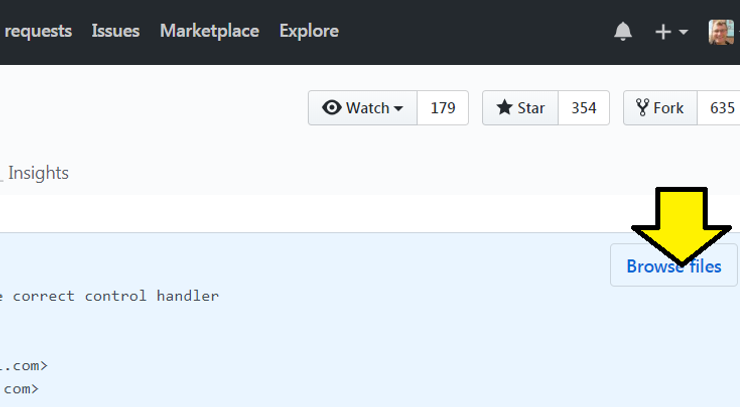
You should be at the link: https://github.com/Xilinx/linux-xlnx/tree/b450e900fdb473a53613ad014f31eedbc80b1c90
Reference
Xilinx logo from https://twitter.com/xilinxinc at link
