

Xilinx’s Wiki Instructions to Add Yocto Layer Fail with PetaLinux Tools 2017.4

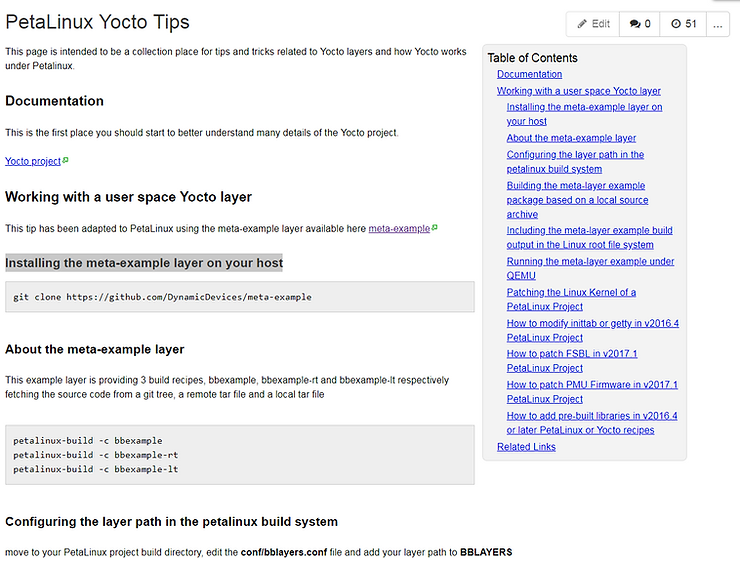
This post lists an error I got while following the instructions for “Installing the meta-example layer on your host” listed on the “PetaLinux Yocto Tips” at http://www.wiki.xilinx.com/PetaLinux+Yocto+Tips.
TL;DR
The “Installing the meta-example layer on your host” instructions listed on the “PetaLinux Yocto Tips” at http://www.wiki.xilinx.com/PetaLinux+Yocto+Tips as of Mar 24 2018 @ 9:18 AM (MDT) did not work for me with PetaLinux 2017.4.
In addition, the wiki’s instructions conflict with an advisement given in a file the wiki says to edit.
Steps
1. Clone the repo:
git clone https://github.com/DynamicDevices/meta-example
2. Edit bblayers.conf:
vi ./build/conf/bblayers.conf
3. Add the path to meta-example:
/home/pfefferz/plprjs2/zcu102qemu/meta-example \
4. Source the PetaLinux Tools environment and build bbexample:
LOCALTOOLS=$HOME/tools
source $LOCALTOOLS/opt/pkg/petalinux/settings.sh
source $HOME/set_petalinux_env.sh
which make
which petalinux-create

pfefferz@plc2:~/plprjs2/zcu102qemu$ petalinux-build -c bbexample
5. Got the following error:
pfefferz@mach:~/plprjs2/zcu102qemu$ petalinux-build -c bbexample
[INFO] building bbexample
[INFO] sourcing bitbake
INFO: bitbake bbexample
| Loading cache: 100% | #################################### | Time: 0:00:05 |
Loaded 3256 entries from dependency cache.
| Parsing recipes: 100% | ################################## | Time: 0:00:10 |
Parsing of 2466 .bb files complete (2432 cached, 34 parsed). 3259 targets, 225 skipped, 0 masked, 0 errors.
ERROR: Nothing PROVIDES ‘bbexample’
Summary: There was 1 ERROR message shown, returning a non-zero exit code.
ERROR: Failed to build bbexample
webtalk failed:PetaLinux statistics:extra lines detected:notsent_nofile!
webtalk failed:Failed to get PetaLinux usage statistics!
6. Looked at build/conf/bblayers.conf and found that it had been regenerated as it warned at the top of the file:
# WARNING: this configuration has been automatically generated and in
# most cases should not be edited. If you need more flexibility than
# this configuration provides, it is strongly suggested that you set
# up a proper instance of the full build system and use that instead.
A Screenshot of the Instructions

Reference
Find all the bugs image found at link.